
In today’s classrooms, educators are increasingly mindful of how much time students spend in front of screens. While minimizing screen time has become a common goal in schools, it’s important to recognize that not all digital use is created equal. The key isn’t just reducing screen time, but making it purposeful.
When used thoughtfully, educational technology can enhance instruction, foster engagement, and deepen student understanding. Teachers and administrators can shift the focus from screen quantity to screen quality, offering practical strategies and insights to ensure that every minute spent with a device truly supports student growth.
Educational screen time requires the intentional use of digital tools and learning experiences that actively help students build skills, solve problems, think critically, and deepen understanding. The goal is not more screen time, it’s better screen time.
What makes educational screen time effective?
In schools, productive or quality screen time for students refers to the intentional use of digital tools that actively engage students in learning, rather than passively consuming content. Not all interactive learning tools are created equal. Some platforms simply digitize worksheets or deliver surface-level tasks. Others foster critical thinking, collaboration, and deeper understanding.
The difference lies in how technology is used: when aligned with complex concepts or inquiry-based learning, screen time can amplify instruction and make abstract ideas more accessible. By focusing on tools that support meaningful learning experiences, educators can ensure that screen time becomes a powerful ally in the classroom rather than just a placeholder.
High-quality educational screen usage occurs when technology supports active learning, critical thinking, meaningful feedback, and measurable academic growth rather than passive content consumption.
Active vs. passive screen time
One of the most important distinctions educators can make is between active and passive screen time. Passive screen time often involves students consuming content with limited interaction, such as watching videos, scrolling through information, or completing repetitive tasks that require minimal thinking.
Active screen time, by contrast, engages students in problem-solving, exploration, critical thinking, creation, experimentation, and reflection. Students are participants in the learning process rather than observers.
| Passive Screen Time | Active Screen Time |
|---|---|
| Watching | Practicing |
| Consuming | Creating |
| Scrolling | Problem-solving |
| Viewing | Interacting |
| Receiving information | Applying information |
| Limited feedback | Immediate feedback |
| Lower engagement | Higher engagement |
| Entertainment-focused | Learning-focused |
| Few learning signals | Measurable progress |
| One-way experience | Two-way experience |
The most effective educational screen time prioritizes active learning experiences that help students build knowledge and apply new skills.
How do I know if a digital learning tool is worth using?
What makes screen time effective for students? How do you know if a digital learning tool will help in your classroom? The best digital learning solutions do more than keep students busy. They promote active learning, provide meaningful feedback, support instructional goals, and demonstrate measurable student growth. If a tool helps students think critically, solve problems, and apply new knowledge, it’s more likely to have a positive impact on learning outcomes.
How to identify high-impact educational screen time
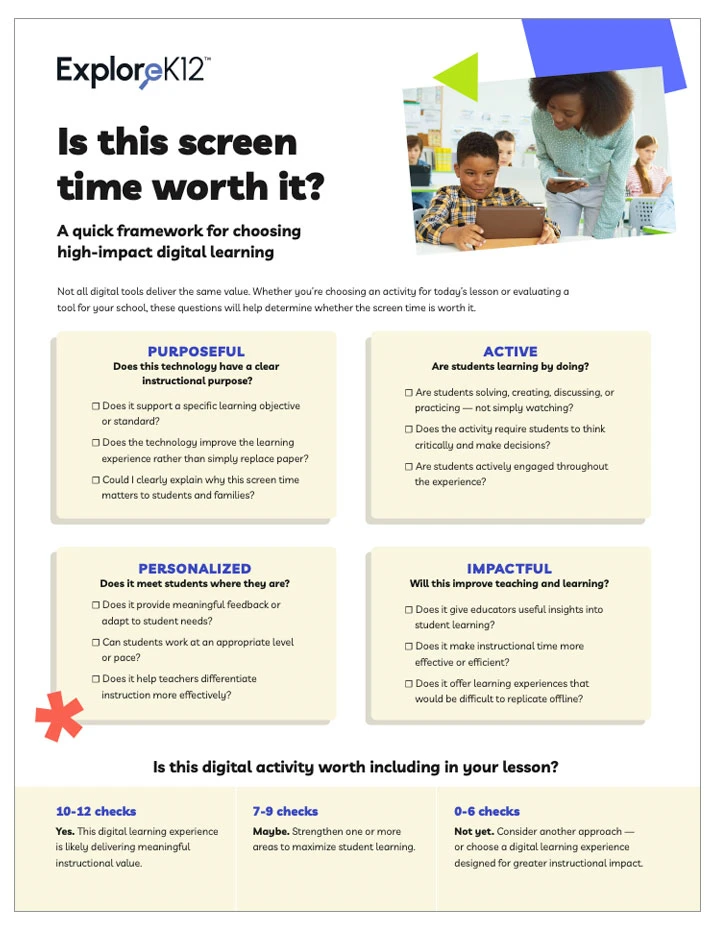
Not all digital learning tools provide the same value. Before introducing a new tool, consider whether it supports meaningful learning outcomes and enhances classroom instruction.
Educational screen time evaluation checklist
- Does it require critical thinking and problem-solving?
- Does it provide meaningful feedback to students?
- Does it support specific instructional goals or standards?
- Does it build measurable academic skills?
- Does it actively engage students rather than encourage passive consumption?
- Does it make difficult concepts easier to understand?
- Does it help teachers personalize learning?
- Does it provide evidence of student growth or progress?
The strongest digital learning solutions don't simply keep students occupied. They help students build knowledge, practice skills, and apply learning in meaningful ways.
Edtech usage strategies that maximize impact
To make the most of screen time in the classroom, teachers can adopt a few key strategies that ensure digital tools are used with purpose and precision. It starts with aligning technology to clear learning goals—whether you're targeting critical thinking, content mastery, or problem-solving, the tool should enhance instruction, not distract from it.
Prioritizing active engagement is also essential. Choose platforms encouraging students to create, collaborate, and think critically through simulations, interactive lessons, or student-led projects. These experiences tend to foster deeper learning than tools that rely on passive consumption.
Another powerful strategy is using technology to differentiate instruction. Adaptive, accessible platforms and customizable content allow teachers to meet diverse student needs, offering personalized pacing and targeted support. Digital tools also shine when integrated into inquiry-based learning, helping students explore complex questions, conduct virtual experiments, or analyze real-world data.
To maintain balance, blend screen time with offline activities—introduce a concept digitally, then reinforce it through discussion, journaling, or hands-on projects. Finally, make time to reflect and refine your approach. Regularly assess the impact of your edtech choices, gather student feedback, and adjust as needed to ensure technology truly supports your instructional goals.
When educators focus on active learning rather than technology for technology's sake, educational screen time becomes a tool for building deeper understanding, stronger engagement, and improved academic outcomes.
Prioritize screens for hard-to-teach topics
Digital tools help students engage with complexity in ways that paper or lecture can't. One of the most effective ways to make screen time meaningful is to reserve it for concepts that are difficult to teach through traditional methods. Science and math digital solutions can bring abstract or complex ideas to life in ways that paper, lecture, or even hands-on activities sometimes can’t. For example:
Simulating scientific phenomena- Interactive simulations can model processes like photosynthesis, chemical reactions, or planetary motion, giving students a dynamic, visual understanding of systems that are otherwise invisible or too slow/fast to observe in real time.
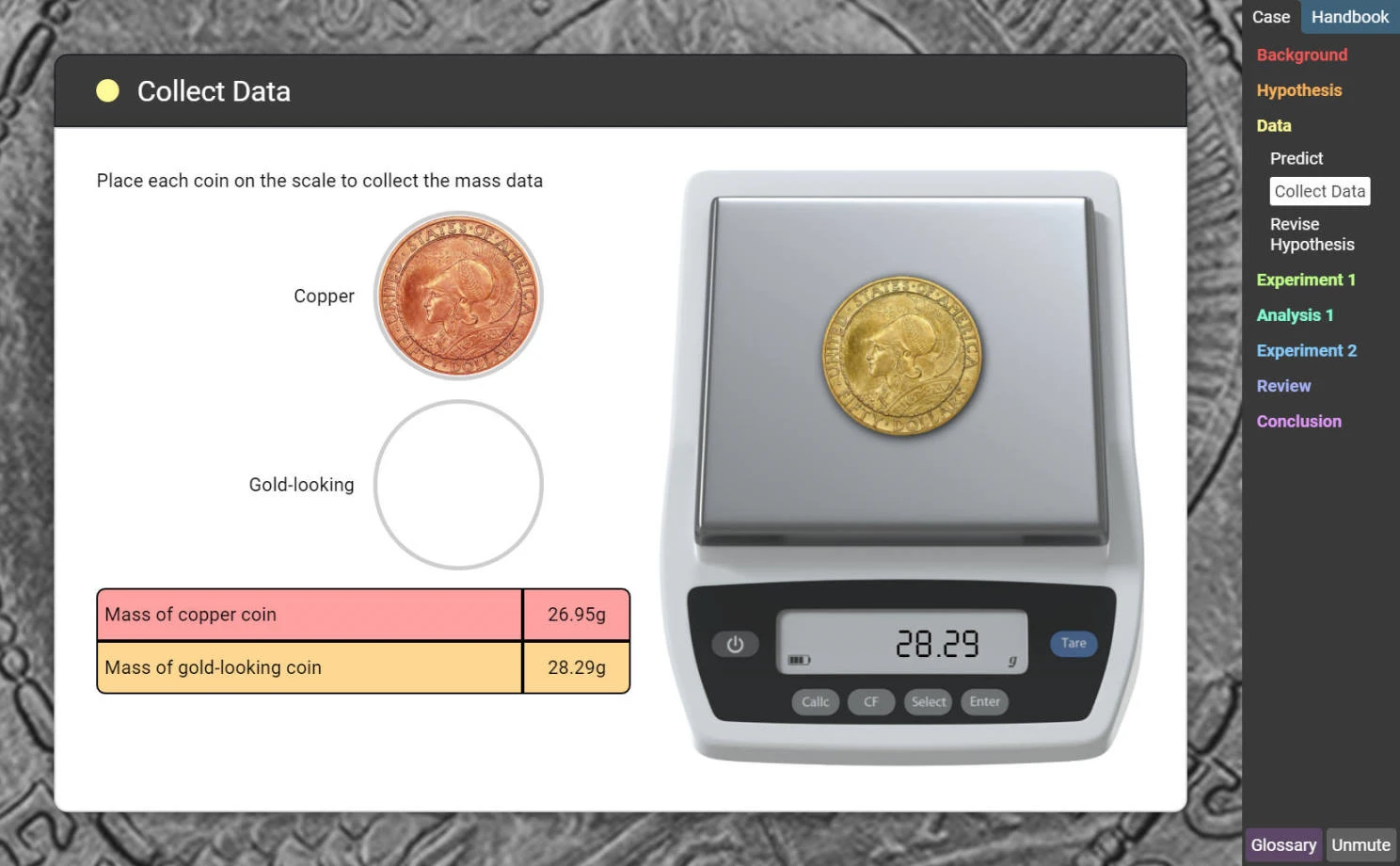
Visualizing abstract math concepts- Adaptive, individualized systems provide teachers with tools to differentiate instruction to meet every student's needs.
Modeling systems in STEM- Whether it’s designing a circuit or exploring ecosystems, digital platforms allow students to experiment, iterate, and see the impact of changes in real time.
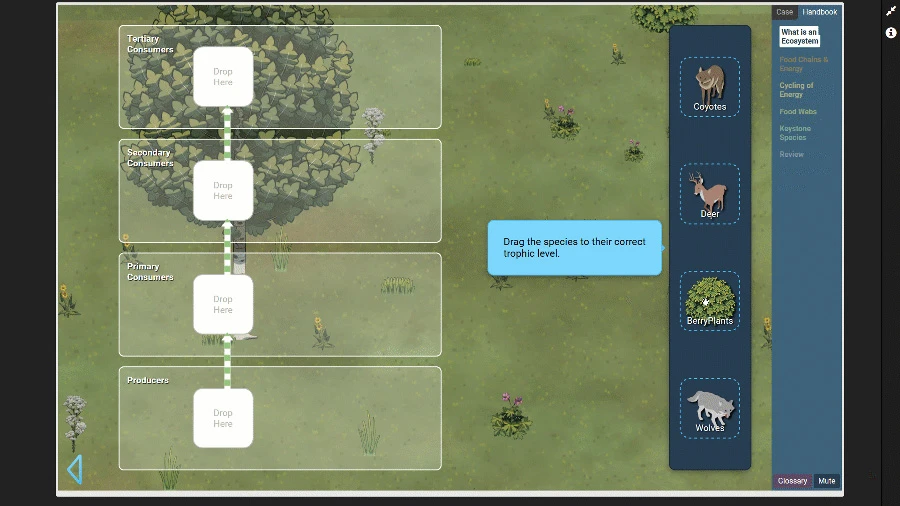
By using screen time to tackle these challenging areas, educators can deepen student understanding and engagement, making technology a strategic asset rather than a distraction.
Choose interactive over passive tech
To truly maximize the value of screen time, prioritize digital tools that promote active learning over passive consumption. The most impactful edtech platforms invite students to engage, think, and respond, not just watch or click. Look for tools that support:
- Active exploration- Platforms that let students manipulate variables, test hypotheses, or explore virtual environments encourage curiosity and hands-on learning.
- Feedback-based learning- Tools that provide immediate, meaningful feedback help students reflect, adjust, and grow in real time.
- Critical thinking- Choose apps that challenge students to analyze, evaluate, and create, not just recall facts or complete repetitive drills.
Avoid relying on tools that center around passive video watching or rote practice without depth. While these may have a place in review or reinforcement, they shouldn’t be the core of your digital instruction. Instead, aim for tech that turns students into participants in their learning, not just observers.
How ExploreK12 supports purposeful edtech use
Every area of STEM education plays a vital role, but some concepts are more complex, harder to teach, and more essential for future success. These foundational skills serve as stepping stones—students who master them are better equipped to tackle advanced math and science challenges, while those who miss them often face ongoing struggles until those gaps are filled.
At ExploreK12 (formerly ExploreLearning), we don’t just support STEM education. We focus on its most critical and challenging parts. These concepts are pivotal for student progress and often the hardest for teachers to address alone.
Our K-12 learning solutions are designed to transform educational screen time into active learning experiences that help students build knowledge, strengthen foundational skills, and achieve measurable growth in math and science.
By zeroing in on these high-impact areas, we empower educators and help students build the skills they need to thrive both in the classroom and beyond.
Research-based design with real learning outcomes
At ExploreK12, we believe every student can succeed in math and science when educators are equipped with the right tools. That’s why our products are built on research-proven, evidence-based strategies that support how students learn best. Through Collab Crew, our innovative co-design and research initiative, we ensure that the voices of both teachers and students are central to how our solutions are developed and continuously improved.
We also partner with districts to conduct ongoing efficacy research, helping educators make outcomes-based decisions with confidence. This collaborative approach provides transparency, accountability, and shared insight into how our tools impact student learning. Our math and science solutions are designed to be as effective as they are engaging.
Reflex, Frax, and Gizmos are designed to target foundational STEM skills that are especially well-suited to digital delivery. These programs use interactive, adaptive, and visual learning experiences to help students build fluency in math, unlock fractions understanding, and develop critical thinking in STEM to make abstract or complex ideas more accessible and engaging than traditional methods alone.
Explore our library of studies that meet ESSA Tiers of Evidence across all our STEM solutions. Conducted by third-party evaluators and district partners, these studies offer unbiased, real-world proof of what works in today’s classrooms.
Differentiation from passive or freemium tools
While free or gamified apps can be appealing, they often fall short when it comes to instructional depth. Many of these tools prioritize entertainment or engagement metrics over meaningful learning outcomes, offering flashy interfaces but little substance. In contrast, high-quality educational technology, like ExploreK12 solutions, is designed to support teacher-led instruction and build real, transferable skills.
These solutions are grounded in pedagogy, not just play, and are built to complement curriculum goals rather than act as screen time fillers. Choosing tools with instructional integrity ensures that every digital moment contributes to student growth.
Supporting district technology and screen time goals
School and district leaders face growing pressure to balance concerns about student screen usage with expectations for improved academic outcomes. As districts evaluate classroom technology investments, the most important question is not how much screen time students have—but whether that screen time supports learning. District leaders should evaluate classroom technology not just by usage metrics, but by student engagement, instructional impact, skill development, and evidence of learning outcomes.
High-quality digital learning solutions should align with instructional priorities, support accountability goals, provide evidence of effectiveness, and demonstrate a strong return on instructional time. When implemented thoughtfully, educational technology can help districts increase student engagement while improving outcomes.
From screen time to skill time: Takeaways for the classroom
Purposeful screen time isn’t about using more technology. It’s about using the right technology. When thoughtfully integrated and balanced, digital tools can boost student engagement, clarify complex concepts, and deepen learning. Educators can transform screen time into skill by prioritizing tools that promote active exploration, support hard-to-teach topics, and align with instructional goals.
Evaluate your screen time strategy by asking:
- Are students thinking, creating, investigating, and solving problems?
- Does the tool provide meaningful feedback?
- Does it support curriculum and instructional goals?
- Can you measure learning outcomes and student growth?
- Are students actively participating rather than passively consuming content?
- Does the technology make difficult concepts easier to understand?
Purposeful educational screen time isn't about using more technology—it's about creating more opportunities for active learning, meaningful engagement, and lasting academic growth.
Connect with our team to explore how ExploreK12 solutions can elevate your instruction or request a demo or pilot. Let’s make every digital moment count.

Frequently asked questions about educational screen time
What is educational screen time?
Educational screen time is the intentional use of digital tools and learning experiences that help students build knowledge, practice skills, solve problems, and engage in active learning. Unlike passive screen use, educational screen time supports measurable learning outcomes.
What is the difference between active and passive screen time?
Active screen time requires students to think, create, investigate, and apply knowledge. Passive screen time generally involves consuming information with limited interaction, such as watching videos or scrolling through content.
How can teachers make screen time more effective?
Teachers can improve the effectiveness of screen time by aligning technology with instructional goals, choosing tools that promote active learning, providing opportunities for discussion and reflection, and measuring student outcomes.
How much educational screen time is appropriate?
There is no one-size-fits-all answer. Educators should focus less on the quantity of screen time and more on the quality of learning experiences. High-quality educational screen time should support clear instructional goals and meaningful student engagement.
How should districts evaluate digital learning tools?
Districts should look for solutions that align to curriculum goals, promote active learning, provide evidence of effectiveness, generate meaningful feedback, and demonstrate measurable academic outcomes.